API
Summary: The API menu opens the XBRUSH Public API documentation — the same image and video generation, editing, and utility features you use in Workspace, callable from your own service. The page has two export buttons: Copy for LLM hands the entire spec to an AI assistant so it can write your integration code, and Download .txt saves the same document as a file.
Overview
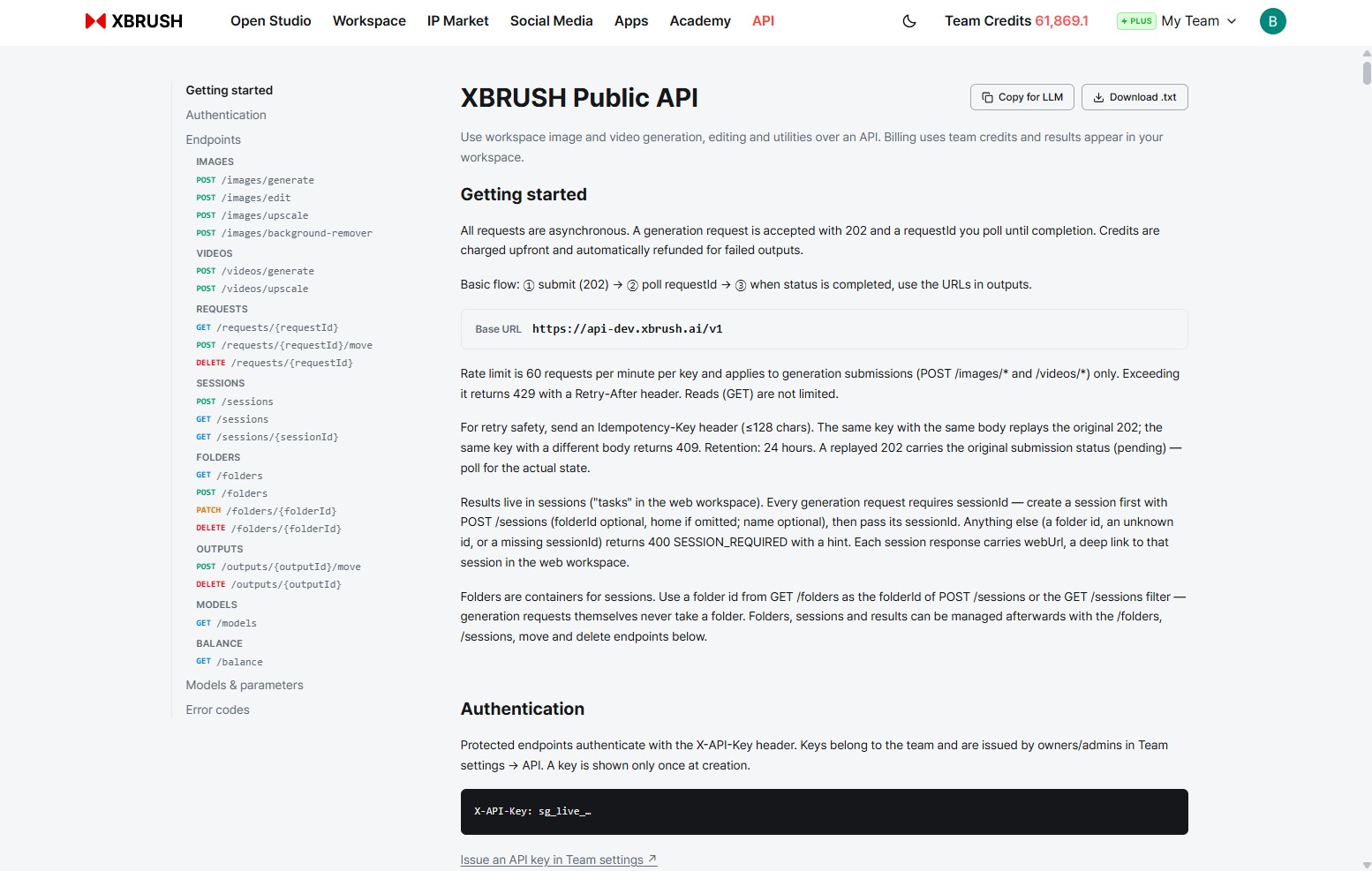
The API documentation page. Endpoints are listed on the left; the spec itself is on the right.
Click API in the top navigation. The page needs no login to read.
The left navigation runs through the whole document in order:
| Section | What it covers |
|---|---|
| Getting started | The asynchronous flow, Base URL, billing, rate limits, sessions |
| Authentication | The X-API-Key header and where keys come from |
| Endpoints | Every endpoint, grouped by resource, with request examples |
| Models & parameters | Which models you can call and what each accepts |
| Error codes | What each failure means |
Under Endpoints, the resource groups are:
| Group | Endpoints |
|---|---|
| Images | POST /images/generate · /images/edit · /images/upscale · /images/background-remover |
| Videos | POST /videos/generate · /videos/upscale |
| Requests | GET /requests/{requestId} · POST /requests/{requestId}/move · DELETE /requests/{requestId} |
| Sessions | POST /sessions · GET /sessions · GET /sessions/{sessionId} |
| Folders | GET /folders · POST /folders · PATCH /folders/{folderId} · DELETE /folders/{folderId} |
| Outputs | POST /outputs/{outputId}/move · DELETE /outputs/{outputId} |
| Models | GET /models |
| Balance | GET /balance |
Copy for LLM
The Copy for LLM button at the top right copies the entire API document to your clipboard as plain text, laid out for an AI assistant to read.
Paste it into ChatGPT, Claude, Cursor, or any coding assistant, and the model has the full spec in context — endpoints, parameters, the request flow, and the rules — so you can ask it to write your integration directly instead of describing the API yourself.
The copied text begins like this:
# XBRUSH Public API

Generate and edit images and videos via API using XBRUSH workspace models.
Billing uses team points; results also appear in the team workspace.

Base URL: https://api-dev.xbrush.ai/v1

## Overview

- All generation requests are asynchronous: submit returns 202 with a
  requestId; poll GET /requests/{requestId} until status is "completed",
  then use the URLs in outputs.
- Points are charged upfront on submission and automatically refunded for
  failed outputs (proportionally; fully on total failure).
- Rate limit: 60 requests per minute per API key, applied to generation
  submissions (POST /images/* and /videos/*) only. Exceeding returns 429
  with a Retry-After header. Reads (GET) are not limited.
- Idempotency: send an Idempotency-Key header (max 128 chars) for retry
  safety. ...
- Sessions: every generation request REQUIRES sessionId — results live in
  sessions ("results only exist in sessions"). ...

## Authentication

Protected endpoints require the X-API-Key header:

    X-API-Key: sg_live_...

## Endpoints

### Images

#### POST /images/generate
...
Three things about this format make it work well as LLM input:
- Plain text, no markup to parse — headings, bullets, and fenced code only.
- Rules stated before endpoints — the asynchronous flow, billing, rate limits, idempotency, and the session requirement all appear in
## Overview, before any endpoint. The model reads the constraints before it sees a single URL. - A runnable example per endpoint — each endpoint carries a complete
curlcommand, so the model copies a working shape rather than inventing one:
curl -X POST https://api-dev.xbrush.ai/v1/images/generate \
  -H 'X-API-Key: YOUR_API_KEY' \
  -H 'Content-Type: application/json' \
  -d '{
  "model": "z-image-free",
  "prompt": "a cat astronaut floating in space",
  "imageCount": 2,
  "sessionId": "a1b2c3d4-5e6f-4a7b-8c9d-0e1f2a3b4c5d"
}'
⚠️ The excerpts above are from the development environment. Always use the Base URL shown on the page rather than one copied from a document.
Download .txt
Download .txt saves the exact same document as a text file instead of putting it on the clipboard. Use it when the content should stay somewhere rather than be pasted once:
- Commit it to your repository so integration code and the spec it was written against stay together.
- Attach it to a project or knowledge base in your AI assistant, where it stays in context across sessions.
- Keep it for offline reference, or hand it to a teammate who has no XBRUSH account.
Because the specification changes as the API evolves, download it again when you revisit the integration rather than trusting an old copy.
What the Page Tells You
You do not need to read the whole specification to know whether the API fits. These are the parts that decide your design.
Requests are asynchronous
Nothing returns an image directly. A generation request is accepted with 202 and a requestId; you poll GET /requests/{requestId} until status is completed, then read the URLs in outputs. Build the polling loop first — every other feature depends on it.
Sessions are mandatory
Every generation request requires a sessionId. Results only exist inside sessions, which appear as tasks in the web workspace.
Create one with POST /sessions — folderId optional (omit it for the workspace home), name optional — and pass the returned sessionId. A folder id, an unknown id, or a missing sessionId is rejected with 400 SESSION_REQUIRED, with a hint in the detail. Each session response carries a webUrl that deep-links to that session in the web workspace.
Folders are containers for sessions: a folder id belongs in POST /sessions or the GET /sessions filter, never in a generation request.
Billing and refunds
Credits are charged upfront on submission and refunded automatically for failed outputs — proportionally on partial failure, in full on total failure. Charges come from team credits, and every result also appears in the team workspace, so API usage and web usage share one balance and one library. Check the balance with GET /balance.
Rate limits and retries
60 requests per minute per key, applied to generation submissions (POST /images/* and /videos/*) only — reads are not limited. Exceeding it returns 429 with a Retry-After header.
For safe retries, send an Idempotency-Key header (max 128 characters). The same key with the same body replays the original 202; the same key with a different body returns 409. Keys are retained 24 hours. Note that a replayed 202 carries the original submission status (pending) — poll for the actual state rather than trusting it.
Authentication and Keys
Protected endpoints authenticate with the X-API-Key header:
X-API-Key: sg_live_...
Keys belong to a team, not to an individual, and are issued by the team's owner or admin under Team settings → API.
🔑 A key is shown only once, at creation. Copy it into your secret store immediately. If you lose it, issue a new one — an existing key cannot be revealed again.
Because the key carries the team's credits, treat it like a password: keep it server-side, never in client code or a public repository, and issue separate keys for separate services so one can be revoked without disturbing the others.
- Learn more: Team guide · Credit Usage History · Workspace guide